
Teacher's Assistant: Classroom Management Notes5.7.7 - App Store
You'll be able to see results in few seconds.
Publisher Description
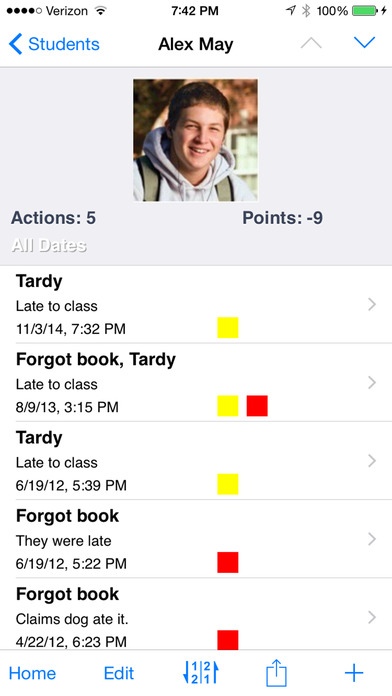
Check out one of the best time-saving classroom management apps around!
Teachers are expected to document almost all student and parent interaction. Keep all this information at your fingertips with Teacher's Assistant.
Teacher's Assistant allows teachers to document student actions and achievements in the classroom. The free version allows you to use with an unlimited number of students and up to 5 actions per student. Try before you buy!
Listed "What's Hot" by Apple, Featured in USA TODAY as one of the "best teacher apps"!, TeacherCast.net, Classroom 2.0 LIVE!
"This is definitely a MUST HAVE app for classroom teachers. The features allow me to quickly document both concerns and accolades for students. I can immediately contact parents via email with the push of a button"- Michael in Georgia
"My paperwork has been cut down by more than half"- Yvonne in California.
"I have wanted the ability to have an anecdotal record for parent conference purposes"- Judy in Ohio
Communicate quickly and easily with parents via iPhone or iPad. The app is used by nearly 100,000 teachers from around the world.
Teacher's Assistant stores the data you enter, and when you're ready to contact the parent or have a conference, you have all the data you need. The app stores the name of the infraction/accolade, the date and time, where it occurred, any pictures you attached, which class period, a detailed description, what teacher action was issued (and if it was served), and whether the parent had been notified.
You can also share data with other Teacher's Assistant Pro users via email, dropbox, or backup your data in iTunes. You can also export all your student action records via email or dropbox.
Email student actions to administrators and parents easily and quickly
Use colors and points for documentation
Print actions
Call/text parents right away
Store parent names and student contact info
Add a photo to any action for more thorough documentation
Filter your students by class, action, or just about anything
Use random student lists and groups for class participation (Randomizer)
Easily enter details
Send announcements to all students or pick classes using Email Blast
Edit, customize, add or hide any field
Change just about any text in the app to suite your needs
Add a secure PIN to open the app
Video Help available on the main screen
Delete all actions without deleting students for easy "end of term" clean-up
Made by a teacher (who still teaches), for other teachers
Please contact me directly at chris@cleveriosapps.com if you have any issues or problems which would have you leave less than a 5 star review. Your reviews allow great new features & regular updates.
Requires iOS 6.0 or later. Compatible with iPhone, iPad, and iPod touch.
About Teacher's Assistant: Classroom Management Notes
The company that develops Teacher's Assistant: Classroom Management Notes is Lesson Portal, LLC. The latest version released by its developer is 5.7.7.
To install Teacher's Assistant: Classroom Management Notes on your iOS device, just click the green Continue To App button above to start the installation process. The app is listed on our website since 2010-11-01 and was downloaded 0 times. We have already checked if the download link is safe, however for your own protection we recommend that you scan the downloaded app with your antivirus. Your antivirus may detect the Teacher's Assistant: Classroom Management Notes as malware if the download link is broken.
How to install Teacher's Assistant: Classroom Management Notes on your iOS device:
- Click on the Continue To App button on our website. This will redirect you to the App Store.
- Once the Teacher's Assistant: Classroom Management Notes is shown in the iTunes listing of your iOS device, you can start its download and installation. Tap on the GET button to the right of the app to start downloading it.
- If you are not logged-in the iOS appstore app, you'll be prompted for your your Apple ID and/or password.
- After Teacher's Assistant: Classroom Management Notes is downloaded, you'll see an INSTALL button to the right. Tap on it to start the actual installation of the iOS app.
- Once installation is finished you can tap on the OPEN button to start it. Its icon will also be added to your device home screen.
Program Details
System requirements
Download information
Pricing
Version History
version 5.7.7
posted on 2010-11-01
Disclaimer
Official App Store Link
We do not host Teacher's Assistant: Classroom Management Notes on our servers. We did not scan it for viruses, adware, spyware or other type of malware. This app is hosted by Apple and passed their terms and conditions to be listed there. We recommend caution when installing it.
The App Store link for Teacher's Assistant: Classroom Management Notes is provided to you by apps112.com without any warranties, representations or guarantees of any kind, so access it at your own risk.
If you have questions regarding this particular app contact the publisher directly. For questions about the functionalities of apps112.com contact us.
